Engineering Report / Beta Firmware V1.2.82
3D Playback
Defects
Two reproducible issues in frame packed 3D
This report documents two separate defects observed on the Titan Noir Max running beta firmware V1.2.82. The first affects motion in 3D. The second affects color integrity when RBE reduction is enabled in 3D.
- Unit
- Titan Noir Max
- Firmware
- V1.2.82 beta
- Mode
- Frame Packed 3D
- Source
- 24p Frame Packed
- Reference
- XGIMI Horizon 20
6:4 Frame Cadence
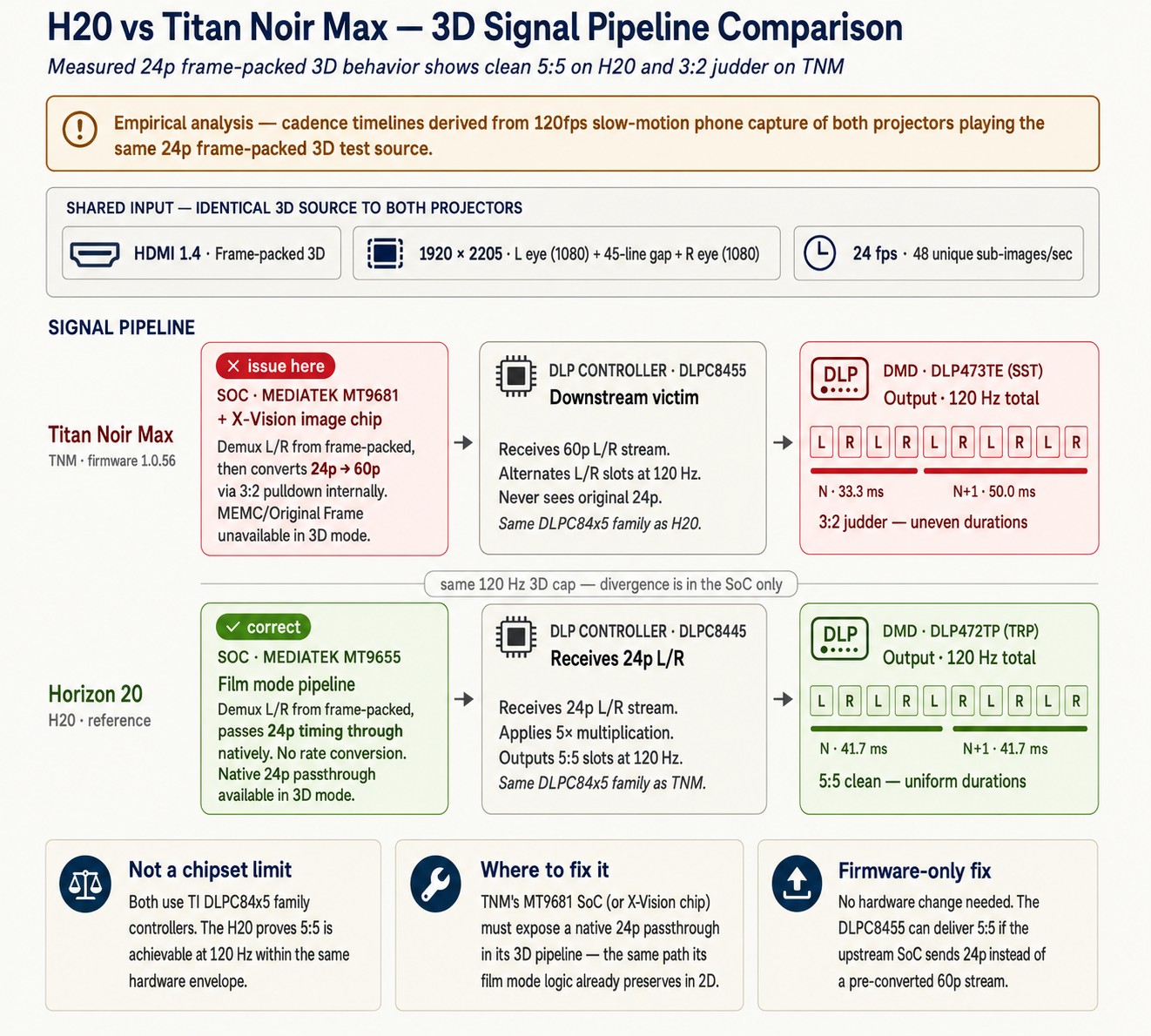
The 24p frame packed signal appears to be converted to 60p inside the SoC. Frames are presented on an uneven 6:4 cadence instead of the expected 5:5, which produces visible judder on any camera pan.
RBE Reduction Dithering
Enabling RBE reduction in 3D introduces heavy dithering with colored pixel artifacts across the image. The colored pixels are not present when RBE reduction is turned off, although dithering behavior is also seen in 2D mode on this unit.
Uneven Frame Cadence in 3D
A 24p frame packed source should hold each frame for an equal interval. On the Titan Noir Max it does not. Frame durations alternate, and the imbalance is consistent and measurable.
What the capture shows (RTINGS 3D test pattern) Jump to video evidence
Recording the screen at 120 fps gives ten captured frames for every two source frames at 24p. Each source frame should therefore occupy exactly five captured frames, giving a 5:5 cadence. The Horizon 20 behaves this way. The Titan Noir Max alternates between four and six, giving a 6:4 cadence that repeats for the length of the clip. This causes a noticeable motion issue in 3D.
Schematic of the counted sequences. On the Titan Noir Max the sequence boundaries drift off the 24p frame boundaries. On the Horizon 20 they land on them.
Probable cause
The 4 and 6 pattern is the signature of a 3:2 style pulldown. It is what you get when a 24p signal is converted to 60p before it reaches the panel, since 60 does not divide evenly by 24. The Horizon 20 accepts the same source over the same chain and shows a clean 5:5 cadence, which points to a firmware or SoC pipeline decision on the Titan Noir Max rather than a limitation of the source or the display device.
Please review what happens to the 24p frame packed signal at the SoC level. The evidence indicates a 24p to 60p conversion is taking place ahead of the left and right eye demultiplex. Passing 24p through natively, as the Horizon 20 does, should restore an even cadence.
How to reproduce
- Play the RTINGS 3D test pattern as a frame packed source. Set the projector to frame packed 3D mode. Test file download: rtings_3D_Final.mkv
- Lower the camera exposure before recording so that the individual color sequences are dark enough to read on playback.
- Record the screen at 120 fps with an iPhone or a comparable phone.
- Open the resulting MOV file in MPC-HC or VLC and step through it frame by frame.
- Count the color sequences per source frame. The Titan Noir Max alternates 4 then 6 then 4. The Horizon 20 holds a steady 5 and 5.
The data shown above was produced with this exact process, using a Horizon 20 and a Titan Noir Max under identical conditions.
Evidence
https://hometheaterphotos.com/projector2/TNM_6_4_Cadence_issue.mp4Frame by frame playback of the 120 fps capture. The alternating run lengths of four and six are visible as the clip advances.
Please see below for detailed analysis & resolution recommendations
RBE Reduction Dithering in 3D
This issue is independent of the cadence problem and can be evaluated separately. It affects color integrity rather than motion.
What happens
With RBE reduction enabled in 3D mode, the image shows heavy dithering with colored pixel artifacts scattered across the frame. The artifacts are most visible in dark and mid tone areas and they hold their position long enough to read as fixed noise rather than as film grain.
Turning RBE reduction off is a clear improvement. The colored pixels are not present with the feature disabled, using the same content, the same scene and the same picture settings, which points to the RBE reduction path in 3D as the source of this particular artifact.
To be clear, disabling RBE reduction is not a complete fix. This unit also shows dithering behavior in 2D mode, so a separate dither issue exists outside of the 3D pipeline. The colored pixel artifacts described here are the ones tied to RBE reduction in 3D.
The screenshot below is taken from Pacific Rim 3D. The colored pixels visible here are not present when RBE reduction is off.

Requested from engineering
- Review the dither pattern applied by RBE reduction while the projector is in 3D mode.
- Confirm whether the 3D path is using a different or unclamped dither table compared with the 2D path.
- Users should not have to disable rainbow effect reduction to avoid colored pixel artifacts. Both should be usable together.
Test Setup
Both defects were captured under the conditions below. Every measurement is repeatable with off the shelf equipment.
| Item | Detail |
|---|---|
| Unit under test | XGIMI Titan Noir Max, beta firmware V1.2.82 |
| Reference unit | XGIMI Horizon 20 |
| Projector mode | Frame packed 3D |
| Test pattern | RTINGS 3D test, frame packed, 24p |
| Content sample | Pacific Rim 3D |
| Capture device | iPhone at 120 fps, exposure reduced before recording |
| Analysis | Frame by frame stepping in MPC-HC or VLC |
| Result on Titan Noir Max | 6:4 cadence, and colored dithering with RBE reduction on |
| Result on Horizon 20 | 5:5 cadence, no cadence defect present |
Summary of requests
- Trace the 24p frame packed signal through the SoC and confirm whether it is being converted to 60p before the left and right eye demultiplex.
- Restore a native 24p path in frame packed 3D so that the cadence returns to 5:5, matching the Horizon 20.
- Review the RBE reduction dither implementation in the 3D pipeline and remove the colored pixel artifacts.